Skip to content

Before choosing IP management software for your enterprise, you need to decide how your team will capture new inventions, collect the right information from inventors, assess disclosures, and move promising ideas toward patent filing.
Only then you can successfully find a platform that can track patents, manage deadlines, and organize your portfolio.
One platform may cover much of this work. Another may handle portfolio management well but leave gaps in your invention disclosure process. You could also keep your existing systems and add specialist tools where they solve a clear problem.
This guide compares enterprise IP management software, explains the trade-offs between all-in-one platforms and best-of-breed tools, and shows you how to assess costs, integrations, and workflow needs before you buy.
You’ll also learn how to connect invention harvesting and disclosure with your existing docketing and portfolio systems, without replacing tools that already do their job well.
What Is Enterprise IP Management Software?
Enterprise IP management software helps companies organize and manage their intellectual property, including patents, trademarks, and related legal records.
Depending on the platform, it can support patent deadlines, prosecution, renewals, budgets, portfolio reporting, invention disclosures, and internal review workflows.
But not every IP management system does all these jobs equally well.
Some focus on managing existing IP assets and legal matters. Others help teams capture new inventions, develop disclosures, and decide which ideas deserve further review. Some platforms cover both.
For an enterprise IP team, these differences matter because the work doesn’t start when a patent application enters the docketing system. It starts when an employee identifies a potential invention and the company needs to capture enough information to assess it.
Consider two parts of the same workflow
- Before filing, inventors need a clear way to explain their ideas. The IP team needs complete disclosures, technical context, and a process to review and prioritize submissions.
- After a decision to pursue protection, the team needs reliable matter records, filing deadlines, prosecution tracking, and portfolio oversight.
These stages connect, but they serve different needs.
A system built for detailed portfolio administration may not offer the inventor experience your R&D teams need. A tool designed for invention disclosure may not replace the docketing and portfolio controls your legal team already relies on.
That’s why you should assess IP management software by the work it supports, not just by the number of features on its product page.
Before comparing vendors, separate your requirements into three groups:
- Invention harvesting and disclosure. How will you capture potential inventions, help inventors provide the right details, and route disclosures for review?
- IP administration. How will you manage formal matters, deadlines, prosecution, renewals, and portfolio records?
- Intelligence and decision support. How will you search prior art, assess disclosures, track spending, and decide which inventions deserve further investment?
What Should Enterprises Look for in IP Management Software?
The best IP management software for your enterprise is the one that fits your portfolio, your team’s workflow, and the systems you already use. A long feature list won’t tell you whether the software will solve your biggest problems.
Before you compare vendors, map what your IP team needs to do, where work slows down, and which systems already handle the job well.
Here are seven areas to assess.
1. Invention capture and disclosure
Can employees submit potential inventions without struggling through a long or confusing process?
Your IP team needs enough technical detail to assess an invention, but inventors may not know what information to provide. If disclosures arrive as incomplete forms, emails, slide decks, or meeting notes, your team may spend time chasing answers before it can even begin a review.
Look for software that can guide inventors through disclosure, ask for missing details, support attachments, and route submissions to the right reviewers.
Ask vendors:
- Can the system guide inventors through the disclosure process?
- Can we tailor questions to different technologies or business units?
- Can reviewers request missing information and track the response?
- Can employees submit and follow up on disclosures without learning a complex new system?
If your current docketing platform handles formal patent matters well but doesn’t support this early-stage workflow, you may not need to replace it. A dedicated invention harvesting tool could fill that gap.
2. Portfolio management and docketing
Can the system keep your patent matters organized and help your team meet its legal deadlines?
For an enterprise with a global patent portfolio, your team may need to track applications across jurisdictions, monitor prosecution, manage office actions, and coordinate with outside counsel.
Check whether the platform supports the jurisdictions, matter types, reporting, deadline controls, and integrations your team needs. Ask how it handles data migration and how your team will verify records during implementation.
Ask vendors:
- Which patent and trademark workflows does the system support?
- How does it calculate, track, and alert users about deadlines?
- Can it manage outside counsel and foreign associate workflows?
- Can we report on portfolio status across jurisdictions and business units?
- What checks help prevent errors when we migrate existing records?
Don’t assume every product described as IP management software provides the same depth of docketing or portfolio control. Verify each capability against your actual requirements.
3. Patent search and decision support
Can your team find relevant information and use it to make better decisions about which inventions to pursue?
Patent search tools can help researchers and IP professionals identify relevant prior art, explore related technologies, and understand the existing patent landscape. Portfolio analytics can support different decisions, such as whether to maintain a patent, explore a technology area, or review the cost of a portfolio.
These are related but different jobs.
A patent search tool isn’t necessarily a portfolio management system, and a portfolio dashboard may not provide the depth of a dedicated search platform.
Find out:
- Can users search by technical concepts as well as keywords?
- Does the product support prior-art search, patent analytics, or both?
- Can the system connect search findings to invention disclosures or patent matters?
- Can reviewers see the evidence behind AI-generated summaries or recommendations?
Choose the capabilities that match your team’s decisions. Don’t pay for a broad research suite if your main need is to improve the quality of disclosures before patent counsel reviews them.
4. Budgeting and outside counsel management
Can your team understand where IP spending goes and connect costs to portfolio decisions?
Your IP budget may cover patent prosecution, outside counsel, translations, filing fees, renewals, and other expenses. Your team may need to forecast costs by matter, jurisdiction, business unit, or technology area.
Check whether the software supports your budgeting and reporting needs or whether you need a separate financial or legal spend tool. These questions will help:
- Can we compare actual spend with planned budgets?
- Can we report on costs by matter, jurisdiction, business unit, and law firm?
- Which features are included, and which require extra modules or integrations?
- Can we track outside counsel performance against agreed measures?
- Can we export data to our finance or reporting systems?
If your finance team already has a reliable way to manage budgets, you may only need an IP system that shares the right matter and cost data. Map that requirement before buying another tool.
Related Asset: Template: IP Budgeting
5. Integrations and data access
Can the software exchange information with the systems your team already relies on?
This is one of the most important questions to ask before you choose between a full-suite platform and specialist tools.
Your organization may already use a docketing system, a document repository, financial software, reporting tools, and an invention disclosure process.
A new product should fit into that environment rather than create another place where employees must enter the same information.
- Which integrations are available today?
- Can the system exchange data through an API, a supported connector, or another documented method?
- Which fields and workflow updates can move between systems?
- Are integrations included in the license or priced separately?
- Who maintains the integration, and what happens when either system changes?
- Can we test the integration before committing to a full rollout?
Don’t stop at a vendor saying that its product “integrates with” another system.
Ask for a demonstration of the exact data exchange you need.
For example, can an approved invention disclosure create or update the relevant record in your docketing system without someone re-entering the same information?
6. Security, confidentiality, and AI controls
Can you trust the system with confidential invention information and sensitive portfolio records?
An invention disclosure may contain details about a product or process that the company hasn’t announced or filed to protect. Your team needs to understand how the vendor stores, accesses, processes, and protects that information.
If the product uses AI, assess those controls separately. Ask which models process your data, whether your information is used to train models, how long prompts and outputs are retained, and whether administrators can control access to AI features.
Ask vendors:
- What security certifications and independent assessments can you provide?
- How do roles and permissions control access to confidential matters?
- Where is customer data stored and processed?
- What retention and deletion policies apply to prompts, files, and outputs?
- Is customer data used to train AI models, and under what terms?
- Can we disable AI features or restrict their use to approved workflows?
Request the relevant security documentation and contractual commitments. Don’t rely on a general claim that a product is secure or AI-ready.
7. Usability, implementation, and adoption
Will inventors, reviewers, attorneys, and administrators actually use the system?
A platform can meet your technical requirements and still fail to improve the workflow if employees find it difficult to use. This is especially important for invention disclosure, where employees may submit ideas only occasionally.
Questel’s 2026 IP Industry Outlook found that 43% of respondents struggled to recruit people with experience or skills in their IP management technology. The same research found that 36% still tracked, communicated, and collaborated on IP tasks through email. These findings don’t prove that software complexity causes email use, but they show why implementation, training, and everyday usability deserve attention. Ask vendors:
- How long does implementation typically take for an organization like ours?
- What work will our IT, legal, and innovation teams need to do?
- Can we pilot the product with a small group before a wider rollout?
- What training and onboarding do you provide?
- Can we measure adoption, completion rates, review time, and the quality of submitted disclosures?
During a pilot, test a real workflow rather than a polished product tour.
Have an employee submit a sample invention, ask a reviewer to request more information, route the disclosure for evaluation, and show how the approved record reaches the next stage.
That will tell you more about the product’s fit than a demonstration of features in isolation.
Turn your requirements into a vendor scorecard
Before booking demos, list your requirements and agree on which ones matter most.
This helps your team compare vendors on the same basis rather than choosing the product with the most impressive presentation.
At a minimum, assess each vendor against these questions:
- Does it solve a problem we have today?
- Does it support our required workflow?
- Can it connect to our existing systems?
- Does it meet our security and confidentiality requirements?
- What will implementation and ongoing maintenance cost?
- Can our employees learn and use it without creating more manual work?
Use the answers to separate essential requirements from optional features. That distinction will also help you compare an all-in-one platform with a combination of specialist tools in the next section.
Top Enterprise IP Management Software Examples and Options
Enterprise IP management software covers several types of tools.
The products below illustrate these different approaches. They aren’t ranked from best to worst. The right shortlist depends on your portfolio, the work you need to support, and the systems your organization already uses.
1. Full-suite and enterprise IP management platforms
These platforms are worth evaluating when you want to centralize IP records, manage formal workflows, and improve visibility across a portfolio.
Anaqua AQX
Anaqua positions AQX as an enterprise IP management platform for complex portfolios.
Its stated capabilities include portfolio management, workflow automation, analytics, reporting, and AI-supported tasks such as processing patent-office communications and extracting information from documents.
Consider AQX if you need a connected environment for portfolio administration, workflow control, and reporting across a large organization.
During a demo, check which modules and AI capabilities are included in the proposed configuration and how the platform would fit your current systems.

Clarivate IPfolio
IPfolio is a cloud-based IP management platform for corporate IP teams. Clarivate describes capabilities for managing inventions, patents, trademarks, and other IP records, along with workflow automation, reporting, analytics, and connections to Clarivate data and third-party tools.
Consider IPfolio if you want a centralized portfolio system with configurable workflows and access to IP data and analytics.
Ask how it supports your specific invention intake process, what configuration is needed, and which integrations are available for your existing environment.

Questel Equinox
Questel’s Equinox suite includes corporate IP management products, docketing capabilities, and Equinox Invention for invention disclosure and the path toward filing.
This makes it relevant to enterprises assessing how much of their invention-to-IP workflow they want to handle within one vendor’s product ecosystem.
Consider Equinox if you want to evaluate portfolio administration alongside invention-to-filing workflows. Compare the specific Equinox products being proposed, rather than assuming every capability is part of a single package.

2. IP management and docketing for corporate teams
Some organizations need strong matter tracking, deadline management, financial controls, and reporting, but may not need the same breadth of functionality as every enterprise platform.
AppColl PM Corporate
AppColl offers cloud-based software for corporate IP teams.
Its PM Corporate product covers portfolio management, docketing, financial management, matter tracking, document storage, and reporting. AppColl also offers Invention Manager for the invention disclosure process.
Consider AppColl if you want to assess portfolio administration and invention management within the same product family. Check the differences between the products, how they handle your portfolio’s complexity, and whether their reporting and financial features meet your needs.

3. Patent search and IP intelligence platforms
Patent intelligence tools help teams investigate existing technology, analyze patent activity, monitor competitors, and support decisions about where to invest in or protect inventions. They complement portfolio management, but they don’t automatically replace a docketing or IP records system.
Patsnap Analytics
Patsnap Analytics focuses on patent search, analysis, collaboration, and monitoring. Its product information describes tools for analyzing technology landscapes, tracking filing trends, reviewing patent data, and sharing findings across teams.
Consider it if your IP and R&D teams need deeper patent intelligence to assess technical opportunities, understand competitors, or investigate potential risks. Verify the search coverage, analytics modules, monitoring features, and export rights available in the package you are evaluating.

InspireIP PQAI
InspireIP-PQAI goes beyond conventional patent search by using AI to assess the technical meaning and context of an invention, rather than relying only on matching keywords.
It accepts natural-language invention descriptions and identifies potentially relevant prior art based on semantic similarity, helping IP teams uncover related technologies even when patent documents use different terminology.
Its capabilities extend beyond retrieving similar documents. PQAI supports contextual assessment of search results, combinational prior-art searches to explore potential obviousness concerns, and tools such as Concept Extractor, Keyword Suggester, CPC Lookup, and GAU Predictor.
These help users identify technical concepts, discover relevant terminology, find patent classifications, and explore the technology areas associated with an invention.
Users can also generate reports and use its API to bring patent-search capabilities into other applications and workflows.
Consider it if your IP team needs to assess invention disclosures, investigate technical overlap, identify relevant prior art, or support early patentability reviews. It can help reduce the time spent building complex search queries and filtering unrelated documents, while giving patent professionals a stronger starting point for their own analysis.

4. Invention harvesting and disclosure software
Invention harvesting takes place before a patent application enters the formal prosecution and docketing workflow. It helps organizations capture potential inventions, gather the technical details needed for review, and assess which disclosures deserve further investment.
This stage can need a different user experience from portfolio administration. Employees need a clear way to submit inventions, while IP teams need structured information and a reliable review process.
InspireIP IP Assist
IP Assist focuses on the part of the IP lifecycle that many enterprise systems don’t fully address: turning early inventions into structured, review-ready disclosures.
For corporate IP leaders, the challenge is not simply tracking patent applications. It is building a reliable invention harvesting process across R&D teams, business units, and locations.
Valuable inventions go unreported all the time.
Employees may not know what information to provide, inventors may struggle to explain the technical contribution, and IP teams can spend weeks chasing details, clarifying disclosures, and coordinating reviews.
This makes it harder to assess inventions consistently and decide where to invest patent budgets.
IP Assist gives enterprises a structured workflow for addressing these problems. It helps teams capture inventions through a central process, guide inventors as they develop and document their contributions, and bring technical details into a more complete invention disclosure.
And AI-assisted guidance helps inventors explore problems, technical variations, applications, and potential novelty.
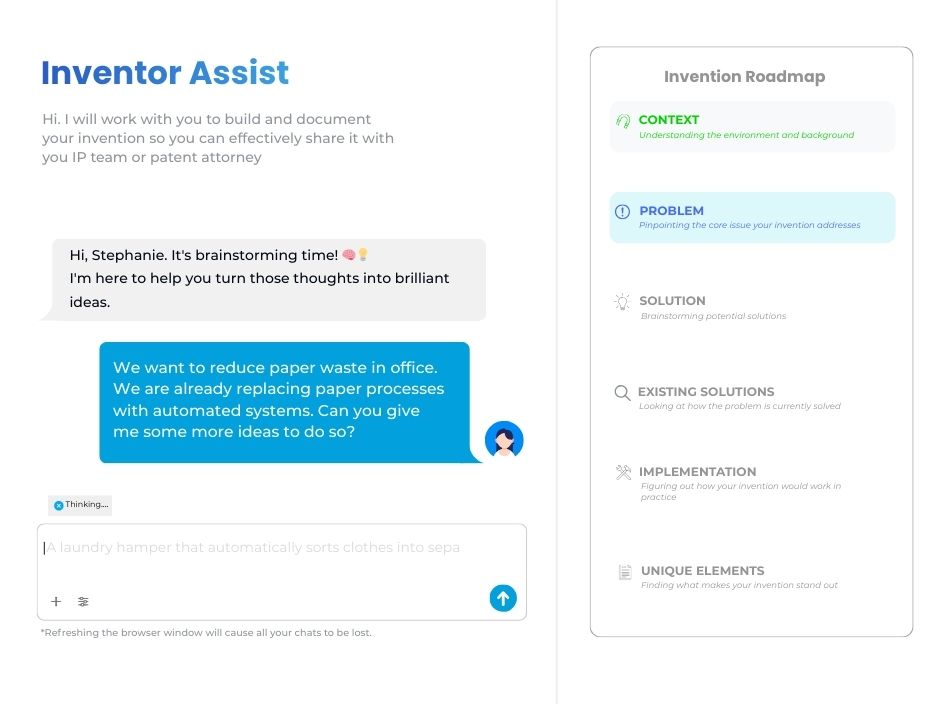
Integrated prior-art search through PQAI can give reviewers additional context when assessing disclosures. Evaluation workflows help route submissions to inventors, co-inventors, review committees, and IP leaders for assessment and decisions.
The value for an enterprise is a more consistent flow of invention disclosures, less manual follow-up, better information for review, and greater visibility into invention activity across the organization.
IP teams spend less time reconstructing incomplete submissions and more time evaluating the inventions that may have strategic or commercial value.
Innovation leaders also get better visibility into participation, submissions, and progress through the invention-to-IP process.
Consider IP Assist if your enterprise wants to increase invention harvesting, improve disclosure quality, reduce delays between invention and IP review, or build a more scalable process without relying on email, spreadsheets, and manual coordination.
IP Assist is designed to complement downstream IP management systems, not replace the tools your team already relies on for formal patent administration.
Before evaluating it, look at how it would fit your invention intake, review, approval, and docketing handoff processes. Ask how it can help your team improve the quality of decisions before committing time and budget to patent filings.

Compare software by the job you need it to do
Use this table as a starting point for your shortlist, not as a substitute for vendor evaluation.
| Product | Main area to evaluate | Key question |
| Anaqua AQX | Enterprise IP lifecycle and portfolio management | Can it support your portfolio complexity, governance, and reporting needs? |
| Clarivate IPfolio | Corporate IP portfolio management and workflow automation | Does its configuration fit your processes and data requirements? |
| Questel Equinox | Corporate IP management, docketing, and invention-to-filing options | Which capabilities are included in the specific products being proposed? |
| AppColl PM Corporate | Corporate portfolio administration and financial workflows | Does it meet your docketing, cost tracking, and reporting requirements? |
| Patsnap Analytics | Patent search and IP intelligence | Does its data and analysis depth match your research needs? |
| InspireIP IP Assist | Invention harvesting and disclosure | Can it improve disclosure quality and connect with your existing downstream systems? |
Map your requirements with our IP Management Software Comparisons Template.
All-in-One IP Management Software vs. Best-of-Breed Tools
When you evaluate enterprise IP management software, you have two main options. You can choose one platform that covers most of your IP workflows, or combine specialist tools with the systems you already use.
What is an all-in-one IP management platform?
An all-in-one platform aims to bring several IP workflows into one system. Depending on the product and modules you buy, it may cover invention intake, portfolio records, docketing, prosecution, renewals, budgeting, reporting, and analytics.
The main advantage is centralization. Your team can work with a more consistent set of records and use shared workflows instead of moving information between separate products.
An all-in-one platform may be a good fit when:
- You’re setting up a new IP management system and don’t have established tools to retain.
- Your current systems create duplicate records or make portfolio reporting difficult.
- You need consistent processes across business units, regions, or outside counsel.
- One vendor can meet most of your requirements without major customization.
- Your team wants a single primary system for administration, access control, and support.
However, a broad product scope doesn’t guarantee that every module will meet your needs equally well. A platform may offer invention disclosure, for example, but its workflow might not suit how your inventors develop and explain new technology.
What is a best-of-breed IP software stack?
A best-of-breed approach combines tools selected for specific jobs, not taking an entire tool package. It saves you from paying for features you never get to use.
An enterprise might retain its existing docketing platform, use a specialist tool for invention harvesting, and add a dedicated patent intelligence product for research.
Each tool has a defined role. The goal is to choose products that perform their jobs well and connect them into a usable workflow.
This approach work well when your organization has a specific budget, or already has a reliable system for portfolio administration but needs to improve a specific part of the workflow.
It also helps you avoid replacing a system that works simply because another product offers more features in a single package.
Compare the two approaches
| Consideration | All-in-one platform | Best-of-breed stack |
| Workflow coverage | Broad coverage within one product ecosystem | Specialist tools cover selected needs |
| Data management | Can reduce duplication if workflows share records | Requires clear rules for data ownership and transfer |
| Integrations | May simplify work within the platform, but external integrations still matter | Often needs more integration planning and maintenance |
| User experience | Can provide one main interface, though some modules may differ | Users may need to learn and switch between several tools |
| Implementation | A broad rollout can be complex | Can start with a smaller gap, but integration work adds effort |
| Flexibility | Depends on configuration and the vendor’s roadmap | Easier to select or change individual tools, subject to dependencies |
| Cost | May consolidate licenses, but modules and implementation can add up | Costs are spread across vendors, integrations, and support and is usually cost-effective way to manage IP |
| Vendor dependency | Greater reliance on one provider | More choice, but more vendor relationships to manage |
How many tools does your enterprise actually need?
Use this table to identify possible gaps before you start adding products.
| Workflow stage | First system to assess | When a specialist tool may help |
| Invention harvesting | Existing disclosure or IP platform | Intake is fragmented or employee participation is low |
| Invention development and evaluation | Existing review workflow | Disclosures lack detail or evaluation is inconsistent |
| Prior-art search | Current search resources | Search depth, coverage, or analysis is insufficient |
| Docketing and prosecution | Current IP management system | Deadline, matter, or outside counsel controls fall short |
| Renewals | Current docketing or renewal service | Global payment coordination or renewal operations need more support |
| Portfolio analytics | Existing reporting and intelligence tools | Leaders need analysis that current reports cannot provide |
Start with the biggest gap, not the largest list of available tools. If one product can cover several requirements without compromising workflow quality, security, or usability, that may be the simpler choice.
If a specialist tool fills a clear gap, check whether it can connect to your existing systems and whether the improvement justifies the extra cost and maintenance.
The next step is to map how information should move from the first invention submission to a filing decision and, where appropriate, into your formal IP records. That is where a well-designed invention-to-IP workflow can make the difference.
Enterprise IP Management Software Pricing: What Should You Budget For?
The cost of enterprise IP management software depends on what you need it to do, how much of your portfolio it covers, and how it fits into your existing systems. The subscription fee is only one part of the total.
Some vendors publish prices for specific plans. Many enterprise platforms use custom quotes based on the product configuration, portfolio, implementation requirements, and services included.
Rather than compare prices before defining your requirements, build a budget that covers the full cost of ownership.
1. Software licenses and subscriptions
Start by understanding how the vendor charges for the software. Common pricing models include:
- Per user: The fee depends on the number of people who need access.
- Per asset or record: The fee depends on the number of patents, trademarks, or other records managed.
- Tiered subscription: The fee depends on the selected package, capacity, or set of features.
- Custom enterprise contract: The vendor quotes a price based on your requirements, configuration, and services.
A plus point: InspireIP does not charge per user, meaning your team keeps growing without increasing your per head budget. You pay for the results, like increase in invention disclosures, filings.
2. Implementation and configuration
Enterprise IP software may need to reflect your company’s review process, reporting structure, access rules, and legal workflows.
Implementation costs can include process mapping, configuration, workflow design, testing, project management, and support from the vendor’s technical team.
Ask for a clear breakdown of what the implementation fee covers. Find out which configuration tasks your team must handle, whether complex changes cost extra, and how the vendor defines a successful rollout.
Also ask how long implementation is likely to take for an organization with a portfolio and workflow similar to yours. A low subscription price may not offer good value if the product needs extensive customization before your team can use it.
3. Data migration and cleanup
If you already use an IP management or docketing system, moving to a new platform can involve more than transferring records.
Your team may need to clean up duplicate entries, check inventor details, map fields between systems, transfer documents, validate deadlines, and confirm that historical records remain usable.
Before signing a contract, ask:
- Which records and documents will the vendor migrate?
- Who will clean and validate the data?
- How will deadline information and matter histories be checked?
- Is migration included in the implementation fee?
- What happens if the migrated data is incomplete or inaccurate?
Plus point: InspireIP ensures this is a seamless process. And removes any unnecessary data migration.
4. Integrations and ongoing maintenance
Connecting an invention disclosure tool, docketing platform, search product, and reporting system may involve setup fees and ongoing technical work.
Some vendors offer standard connectors. Others may require custom API development, middleware, or scheduled data transfers. The cost depends on the systems involved and the type of information you need to exchange.
Ask vendors to separate the initial integration fee from recurring charges for hosting, maintenance, support, and future changes.
Include the internal cost of managing integrations, too. Your IT or operations team may need to monitor failures, resolve mismatched records, manage permissions, and test updates.A specialist tool is worth considering when it solves a meaningful problem, but the improvement must justify the cost of connecting and maintaining it.
5. Training, support, and user adoption
Your team needs to learn the system and use it consistently. Training may be included in the contract, charged separately, or limited to certain user groups.
Budget for onboarding across the roles that will use the product, including inventors, IP counsel, administrators, reviewers, and reporting users.
Ask what support the vendor provides after launch, whether refresher training is available, and how additional users or business units are onboarded.
With InspireIP, you get instant implementation and high adoption rates since its intuitive UI/UX does not require your teams to go through trainings.
6. AI features and specialist modules
Some vendors include AI features in the base product, while others may charge for additional modules, usage, or access to specialist capabilities.
Before comparing offers, clarify what the quoted price includes. If AI is part of the package, ask which tasks it supports, whether usage limits apply, and what controls govern customer data.
For specialist products, check whether the features you need are included in the quoted plan. A vendor may offer invention disclosure, patent search, analytics, or renewal services as separate products or modules rather than as part of one subscription.Compare the cost of the actual workflow you intend to use, not the vendor’s entire product catalogue.
| Cost category | Questions to include in your budget |
| License or subscription | What is the annual fee, and how will it change as usage grows? |
| Implementation | What are the setup, configuration, and testing costs? |
| Data migration | Are data cleanup, transfer, and validation included? |
| Integrations | What are the initial development and ongoing maintenance fees? |
| Training and support | What is included, and what costs extra? |
| Add-on modules | Are AI, analytics, search, or other capabilities separately priced? |
| Internal resources | How much time will IT, legal, and operations teams need? |
| Future changes | What will upgrades, new workflows, or additional business units cost? |
How to Choose the Right IP Software Architecture for Your Enterprise
You don’t have to replace your entire IP management system to improve one part of the workflow. You also shouldn’t add another tool simply because it offers a feature your current platform lacks. First, establish the problem you need to solve and compare the available options against it.
Follow these six steps.
Step 1. Map your current IP workflow
Start by documenting how an invention moves through your organization, from the first employee submission to the decision to file and the creation of a formal IP matter.
Include the people, systems, and handoffs involved at each stage. For example, inventors might submit ideas through a form, the IP team might review them in a separate system, and approved disclosures might then be entered into docketing software.
Record where information is collected, who reviews it, which system holds the official record, and where manual work occurs.
Pay particular attention to:
- Inventions that arrive through email or informal conversations.
- Disclosures that need repeated follow-ups.
- Reviews that stall because ownership is unclear.
- Information that someone has to enter into multiple systems.
- Reports that require manual consolidation.
This map gives you a baseline for assessing new software.
Step 2. Separate essential requirements from optional features
List the capabilities your team needs, then assign each one a priority.
Separate your requirements into three groups:
- Must have: Capabilities needed to meet legal, security, operational, or reporting requirements.
- Should have: Capabilities that would improve the workflow or reduce manual work.
- Could have: Features that may be useful later but don’t justify delaying the project.
For each requirement, define how you will test it. Instead of writing “AI-powered disclosure,” for example, specify what the system should help an inventor or reviewer do and how you will judge the result.
This gives vendors a concrete brief and helps your team compare products on the same basis.
Step 3. Assess the systems you already have
Before purchasing anything, check whether your current platform can meet the requirement through configuration, an existing module, or an integration.
Ask the system owner and vendor:
- Is the capability already available in our current license?
- Can we configure the workflow without custom development?
- Is an upgrade or additional module required?
- Can the system exchange the required data with our other tools?
- What would it cost to make the change and maintain it?
If your docketing system already handles prosecution and deadlines well, there’s little reason to replace it solely because the invention disclosure process needs improvement.
On the other hand, if the existing platform cannot meet essential requirements and the workaround creates ongoing risk or cost, a broader replacement may be justified.
Step 4. Compare the full cost and operational impact
Evaluate each option over the same period, using the same assumptions.
Include subscription fees, implementation, data migration, integrations, training, support, and the internal time needed to operate the system. If you plan to add a specialist tool, include the cost of retaining your current platform and maintaining the connection between them.
Also consider the operational impact:
- Will employees need to learn another system?
- Will the new product reduce or increase manual data entry?
- Who will maintain the integration?
- How easy will it be to export your data or change vendors?
- Will the setup support expected growth in portfolio size and users?
Use your actual workflow and cost estimates to decide.
Step 5. Check security, governance, and integration requirements
Before approving a product, involve the teams responsible for security, IT, legal operations, and data governance.
Confirm how the product handles confidential invention information, user permissions, data retention, audit trails, and data export. If it uses AI, review the relevant terms for model access, data use, retention, and administrator controls.
For every proposed integration, document:
- Which system owns each record.
- Which fields and documents need to move.
- When the transfer should happen.
- How errors and duplicate records will be handled.
- Who is responsible for monitoring and maintenance.
Don’t accept a general statement that two products integrate.
Step 6. Run a pilot and measure the result
A product demo shows you what a vendor wants you to see. A pilot tests whether the product works in your environment.
Choose a limited but representative workflow. For an invention disclosure tool, you might test submissions from one business unit, have reviewers request missing details, route disclosures for evaluation, and transfer approved records to the next stage.
Agree on success measures before the pilot begins. Depending on your problem, these could include:
- Time from submission to a complete disclosure.
- Number of follow-ups needed per disclosure.
- Time spent on manual data entry.
- Reviewer turnaround time.
- Percentage of users who complete the workflow.
- Reliability of the handoff to your existing IP system.
Compare the results with your baseline. Include feedback from inventors, reviewers, IP counsel, and system administrators.
Frequently Asked Questions
What is the best IP management software for enterprises?
The best IP management software depends on your portfolio, workflows, security requirements, and existing systems. Platforms such as Anaqua AQX, Clarivate IPfolio, Questel Equinox, and AppColl offer options for corporate IP management. Specialist products can support tasks such as patent intelligence or invention disclosure. Compare products against your requirements rather than relying on a universal ranking.
How much does enterprise IP management software cost?
Pricing depends on the product, license model, portfolio size, modules, implementation, and integration requirements. Many enterprise platforms use custom quotes. Ask vendors to separate subscription fees from migration, configuration, training, support, and ongoing maintenance. Compare the total cost over the same period rather than looking at the annual license alone.
What are some examples of enterprise IP management software?
Examples include Anaqua AQX, Clarivate IPfolio, Questel Equinox, and AppColl for corporate IP management and related workflows. Patsnap offers patent intelligence and analytics, while InspireIP IP Assist focuses on invention harvesting and disclosure. These products serve different purposes, so verify their current capabilities and product scope before comparing them.
Is there free IP management software for enterprises?
Free resources such as USPTO Patent Public Search, Google Patents, WIPO PATENTSCOPE, and EPO Espacenet can support patent research. They do not provide the same capabilities as a full enterprise IP management system. Check whether a free or limited product supports your needs for disclosure workflows, docketing, access controls, reporting, and integrations before relying on it.
Can an enterprise use separate tools for invention disclosure, patent search, and docketing?
Yes. An enterprise can use specialist tools for different stages of its IP workflow while retaining a central system for formal patent matters. The key is to define which system owns each record, how information moves between tools, who checks the data, and how the integration will be maintained. Compare this approach with a full-suite platform before deciding.
What should enterprises look for when choosing IP management software?
Start with your workflow and identify essential requirements. Assess invention disclosure, docketing, portfolio reporting, search and analytics, integrations, data migration, security, usability, and total cost. Ask vendors to demonstrate the tasks your team needs to complete and test the most important workflows in a pilot before making a commitment.
Can AI automate enterprise IP management?
AI can support specific tasks, such as extracting information from documents, helping inventors structure disclosures, summarizing patent information, or assisting with review. The capabilities vary by product. Ask vendors what the AI actually does, how users verify its output, what data it processes, and whether your organization can control its use. Keep appropriate human review for legal and filing decisions.
Should an enterprise replace its existing docketing system to improve invention harvesting?
Not necessarily. If your docketing system reliably manages formal patent matters and deadlines, a specialist invention harvesting tool may address gaps in early-stage intake and disclosure without requiring a full replacement. Evaluate the quality of the disclosure workflow, the integration with your existing system, security, and the total cost before choosing this approach.